
Open a saved project from the editor. Dravit measures its model for the estimate; a drawing sheet is a separate output.
- In the editor toolbar, select Estimate. Choose the country and region that apply to your project. Set Show totals in to the currency in which you want to read the result. Check Counted in the total to include the categories your decision needs. These choices control the price context, scope and display; use your own project data.
- Select Calculate. Wait for the summary and rows. If a work message remains, the calculation is still running.
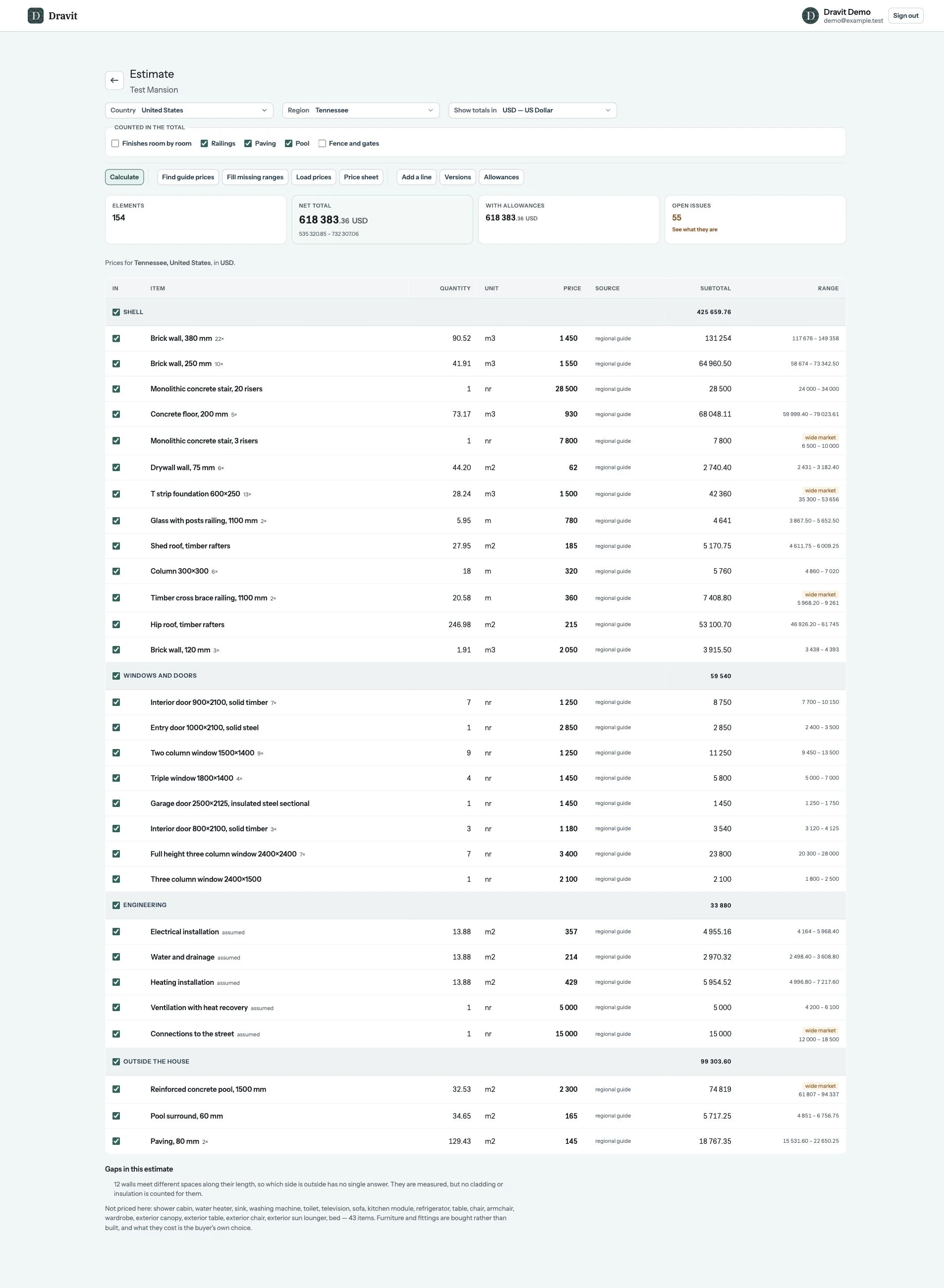
View the full-size estimate result.
Read the result
The screenshot shows Test Mansion, a separate example project. Its 154 Elements and 618,383.36 USD total are results for that model and its selected market, not values to reproduce in your project. Each row separates the modeled quantity and Unit from its guide price and subtotal. For example, the Brick wall row measures 90.52 m³ and has a 1450 USD guide price per unit.
Select Open issues before using the total. In this example, 55 issues include exterior finish assumptions on 12 walls and 43 furniture or fitting objects without prices. Resolve or account for issues relevant to your project, then recalculate. The amount shown is an indicative result for the priced scope, not a complete construction quotation.
Use the detailed guide for prices, allowances, counted work, versions and missing items.